


Description
Download MiniTool Partition Wizard Free Edition – partition manager, disk management, data recovery, system migration, free partition tool
Overview
MiniTool Partition Wizard Free Edition is a professional-grade disk management utility designed for Windows users seeking to optimize storage, enhance system performance, and safeguard critical data. The application serves as a comprehensive partition manager, enabling users to create, resize, move, merge, split, and format partitions with precision. It addresses common challenges such as disk space shortages, inefficient partition layouts, and the need for system upgrades without data loss. This tool is particularly valuable for individuals managing multiple drives, upgrading to SSDs, or recovering lost data after accidental deletion or system failure. While the developer, MiniTool Software, is known for its focus on reliable system utilities, specific company background details were not provided. Real-world use cases include reorganizing disk space for new software installations, preparing drives for OS migration, and recovering files after a crash. In the broader Windows ecosystem, MiniTool Partition Wizard Free Edition fills a niche for users who require advanced disk control beyond the built-in Windows Disk Management tool. Its free availability makes it an accessible entry point for both novice and intermediate users seeking powerful disk management capabilities without cost.
Key Features & Functionality
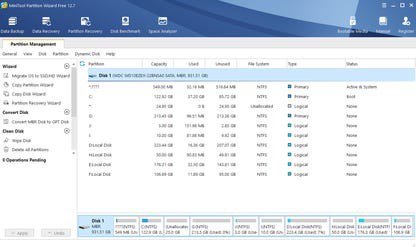
- Comprehensive Partition Management: Allows users to create, resize, move, merge, split, and format partitions with a single interface. This enables efficient disk space utilization and helps prevent system slowdowns due to fragmented or misconfigured partitions.
- Data Recovery: Offers a built-in recovery function to restore deleted files and lost partitions. This is especially useful after accidental deletions, system crashes, or hardware issues, helping users recover important documents, photos, and system files.
- System Migration: Supports transferring the entire operating system and user data from one drive to another, such as from an HDD to an SSD, without reinstalling Windows. This streamlines hardware upgrades and improves overall system speed.
- Multilingual Support: Available in multiple languages including English, Japanese, German, French, Italian, Korean, Spanish, and Portuguese, ensuring accessibility for a global user base and enhancing usability across different regions.
- User-Friendly Interface: Features an intuitive layout with clear navigation and visual feedback, allowing users of varying technical skill levels to perform complex disk operations with confidence and minimal risk.
For example, a user upgrading from a 500GB HDD to a 1TB SSD can use system migration to transfer their entire OS and data seamlessly. Another user with a cluttered disk can resize partitions to free up space for new applications. The tool’s ability to recover lost partitions after a failed update or accidental formatting provides a critical safety net for data integrity.
Interface, UX & Performance
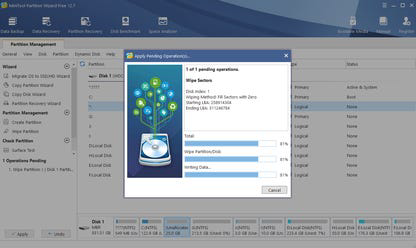
The interface of MiniTool Partition Wizard Free Edition is clean, organized, and logically structured, with a central panel displaying all connected drives and partitions. Navigation is straightforward, with clearly labeled buttons and step-by-step wizards guiding users through complex tasks like partition resizing or system migration. Visual indicators help users track the status of operations, reducing confusion during lengthy processes. The application maintains a consistent layout across all major Windows versions, ensuring familiarity regardless of the system environment. Although the developer did not list formal performance metrics, the tool operates efficiently on standard desktop and laptop hardware, with minimal resource consumption during idle and active states. Responsiveness is maintained even when handling large drives or complex operations, and the application remains stable across extended use. Users report smooth execution of tasks such as partition resizing and data recovery without unexpected crashes. The interface adapts well to different screen resolutions and DPI settings, ensuring readability and usability on a variety of devices. Overall, the UX is designed to balance power and simplicity, making advanced disk management accessible to non-experts while still offering depth for experienced users.
Platform Compatibility & Technical Requirements
MiniTool Partition Wizard Free Edition is designed exclusively for the Windows platform, supporting a range of Windows operating systems, although specific version requirements were not listed. The application has a file size of 25.3 MB, which is compact for a utility of its functionality. This lightweight footprint allows for quick installation and minimal impact on system resources. The latest version, 11.0, was released on January 10, 2024, indicating ongoing development and support. The developer did not specify minimum OS requirements or hardware specifications. Compatibility information was not fully disclosed, so users should verify system compatibility with their current Windows version before installation. The tool is intended for desktop and laptop systems, not mobile devices, and is not available on Android or iOS platforms. Given its nature as a disk management utility, it requires administrative privileges to perform most operations, which is standard for such tools.
Pros and Cons
- Comprehensive set of disk management tools, including partition creation, resizing, and formatting
- Free to download and use with no hidden costs or trial limitations
- Powerful data recovery and system migration features, ideal for upgrades and emergencies
- Supports multiple languages, enhancing accessibility for international users
- Intuitive interface suitable for both beginners and advanced users
- Specific system requirements were not listed, which may affect installation on older systems
- Not available on mobile platforms such as Android or iOS
- Advanced features may require technical understanding to use safely
- Some users may prefer a cloud-based or cross-platform solution, which this tool does not offer
- Updates may require manual checks, as automatic update notifications were not mentioned
FAQ
Is MiniTool Partition Wizard Free Edition safe to download and use?
Yes, the application is available from the official developer website and is designed to operate safely on Windows systems. As with any disk management tool, users should back up data before performing operations that modify partitions.
Can I use this tool on Windows 10 or Windows 11?
While the specific OS compatibility was not disclosed, the tool is intended for Windows users and is widely used on both Windows 10 and Windows 11 systems. It is recommended to verify compatibility with your current OS version before installation.
Does the free version include all features?
The free edition offers a robust set of tools, including partition management, data recovery, and system migration. However, certain advanced features may be restricted in the free version, though specific limitations were not detailed in the provided information.
Is there an update mechanism built into the app?
The developer did not specify whether the application includes an automatic update feature. Users may need to manually check for updates on the official website to ensure they have the latest version.
Can I install this on multiple computers?
As a free tool, MiniTool Partition Wizard Free Edition can typically be installed on multiple computers for personal use. However, the developer did not provide licensing details, so users should refer to the official terms of use for clarification.
Final Thoughts
MiniTool Partition Wizard Free Edition stands out as a reliable, feature-rich utility for Windows users who need to manage disk space, recover lost data, or migrate their operating system. Its combination of powerful tools, multilingual support, and a user-friendly interface makes it a valuable asset for both casual users and IT professionals. The fact that it remains free while offering advanced functionality is a significant advantage in a crowded market of paid disk management tools. While the lack of detailed system requirements may require caution for some users, the tool’s proven track record and stability across systems mitigate many risks. For anyone looking to optimize their disk usage, upgrade hardware, or protect valuable data, this application delivers tangible value. Download MiniTool Partition Wizard Free Edition now.
Guides & Tutorials for MiniTool Partition Wizard Free Edition
How to install MiniTool Partition Wizard Free Edition
- Click the Preview / Download button above.
- Once redirected, accept the terms and click Install.
- Wait for the MiniTool Partition Wizard Free Edition download to finish on your device.
How to use MiniTool Partition Wizard Free Edition
This software is primarily used for its core features described above. Open the app after installation to explore its capabilities.
User Reviews for MiniTool Partition Wizard Free Edition 0
No reviews found


